- C# 100%
| Filename | Latest commit message | Latest commit date |
|---|---|---|
| .github/workflows | ||
| Packages | ||
| ProjectSettings | ||
| .gitattributes | ||
| .gitignore | ||
| CHANGELOG.md | ||
| LICENSE.md | ||
| README.md | ||

PlayerPrefs Editor for Unity 3D





%5D/div%5B1%5D&prefix=v)


Tool extension for the Unity Editor that enables easy access to the player preferences over a simple UI. Allows to view, add, remove and modify entries on the development machine.
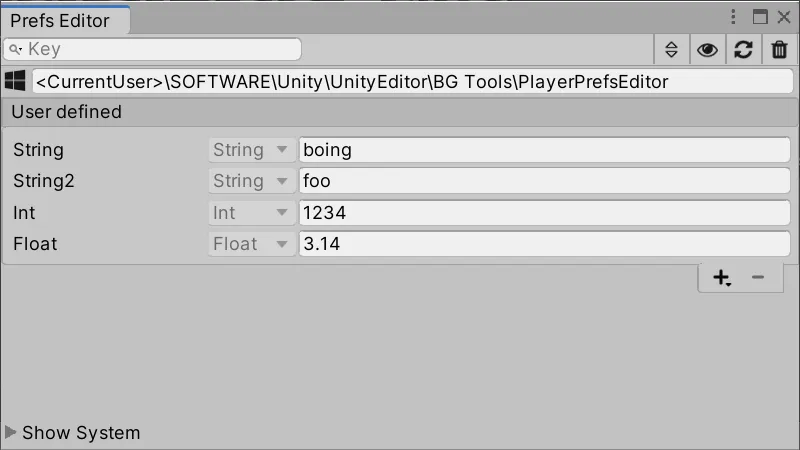
Features
- Add, remove and edit PlayerPrefs
- Intuitive visual editor
- Works with standard Unity PlayerPrefs
- Monitors changes from code
- Supports all editors (Windows, Linux, MacOS)
- Lightweight dockable for full integration in your workflow
- Supports both skins (Personal, Professional)
Requirements
Unity Version: 6.0 or higher
Editor Version: Windows, MacOS, Linux
Installation
The plugin provides manual and UPM installation.
Additionally it's available on the Unity Asset Store and Epic FAB Store.
Manual
Place the PlayerPrefsEditor folder somewhere in your project. It's not relevant where it's located, the plugin will find all of its files by itself.
Unity Package Manager (UPM)
Via Git URL
Through the Unity Plugin Manager it's possible to install the plugin direct from this git repository. The UPM need a specific structure what will be provided into the upm branch.
Use following direct URL for the configuration:
https://github.com/Dysman/bgTools-playerPrefsEditor.git#upm
See official Unity documentation for more informations: UI or manifest.json
Via OpenUPM
The package is available on the openupm registry. It's recommended to install it via openupm-cli.
openupm add com.bgtools.playerprefseditor
Usage
The entry to open the PlayerPrefs Editor is located in the top menu at Tools/CCG-Tools/PlayerPrefs Editor. It's a standard dockable window, so place it wherever it helps to be productive. A more detailed manual can be fund in following locations:
- GitHub (Manual)- Manual page
- GitHub (UPM) - Press the Documentation link on the UPM description.
- Unity Asset Store Package - MANUAL.html